

Demo Builder is a powerful, yet simple to use, software tool for creating professional and fully interactive application demonstrations and simulations, presentations and tutorials.
Support staff, educators and marketing personnel can use the extensive and expanded features, objects and editing tools of Demo Builder to create great looking audio-visual Flash movies that graphically demonstrate your software, processes and other subjects. Included in this newest release: Full-Motion Video Recording,Full editing of custom cursor motion,Import in AVI format,Merge/Split scenes,Rectangle/Ellipse tool - "Fill outer area" option,Set object visibility/locked on canvas at design time,Set Marks through your movies,Improved and faster screen capturing.
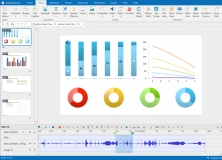


Record screen, annotate, edit screencast videos, and create eLearning contents.














Comments (3)
Benefit -
* A truly rapid production tool thanks to its workflow architecture
* Use to create tutorials, quizzes to web pages
* Easy to edit or add more content
* Easy to sync up and align objects with events or to other objects
* Easy to move, add and adjust annotation objects
* The time line editor makes complete sense
* Free local support provided by The Learning Portal
* Add drop down menus
* Nice Snap-to-Grid function
* Does not require the DirectX component
* Outputs the html and swf - only two files needed
* Does not require that you register with a licensing server
* Does not require .NET framework
* Doubles as a screen capture utility - with the benefit of adding annotations
* Saves to a project file (completely re-editable)
Complete review at: http://www.eiproject.net/reviews/index.php/topic,22.new.html
Caps